Bring your inputs
Enter ingredients and recipes, or use our CSV template. Preview imports before committing them.
Get the free templateA recipe costing workspace for the kitchen you run. Connect ingredients and recipes, preview what a new purchase price changes, and keep a record of the costs you confirm.
2 recipes · 40 ingredients · No card required
You enter the prices. We follow the cost through your recipes.
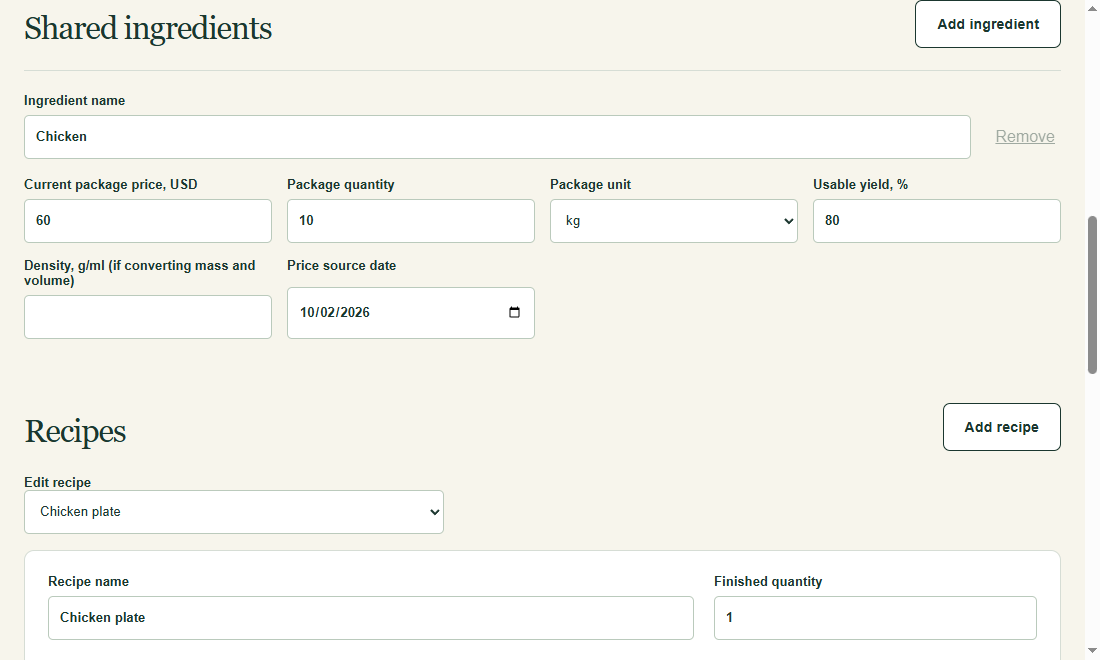
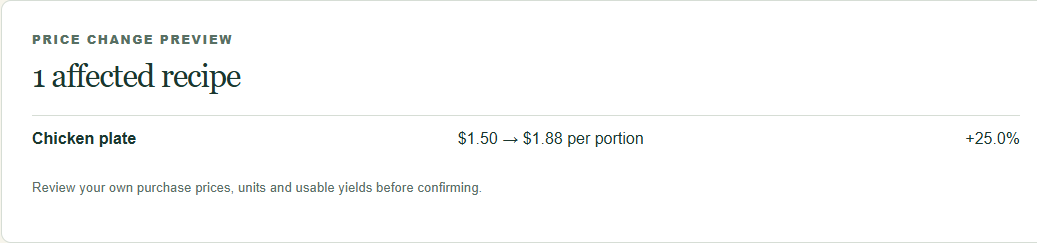
Follow one ingredient from its purchase price to a recipe and the next price-change preview.
Keep price, package size, usable yield and source date together. Recipes reference the same ingredient record.
Try this in the workspace →Actual product screenshots with sample data. Your saved recipes are private.
A new invoice can change more than one dish. Keep one ingredient record, reference it in your recipes, and preview where the increase lands—even through a shared sauce or prep recipe.
See a price-change example →| Recipe | Before | After | Change |
|---|---|---|---|
| Chicken plate 200 g usable | $1.50 | $1.88 | +$0.38 |
| Chicken wrap 120 g usable | $0.90 | $1.13 | +$0.23 |
| Chicken soup 80 g usable | $0.60 | $0.75 | +$0.15 |
Made-up recipes. Values are rounded for display; calculations retain precision.
Change the sample inputs and see the per-serving result. This calculator shows one ingredient's contribution, not a whole dish's cost.
The workspace connects those inputs to your recipes, including shared prep recipes, and saves confirmed changes after you sign in.
See everything in the workspace →+$0.38 per serving · +25.0%
Package price × usable net recipe quantity ÷ (package gross quantity × usable yield) ÷ finished servings. Values stay unrounded until displayed.
Enter ingredients and recipes, or use our CSV template. Preview imports before committing them.
Get the free templateUse net ingredient quantities, usable yield and the finished recipe output. Follow the per-serving calculation.
See how the math worksUpdate a package price, inspect affected recipes, then confirm. Your selling price remains your decision.
Open the workspaceFor a restaurant owner, chef or kitchen manager who knows their purchase prices. One store, one named operator.
Need automatic invoice scanning, POS integrations, inventory or a multi-location team system? Those are outside MenuCostFlow's scope.
Spreadsheets can handle recipe costing. MenuCostFlow gives the connected costing task its own workspace.
| Task | In your spreadsheet | In MenuCostFlow |
|---|---|---|
| Shared ingredient prices | Set up and maintain your references. | One ingredient record used by connected recipes. |
| Yield and units | Build and check the formulas you need. | Compatible units and usable yield in the calculation. |
| A new purchase price | Arrange a before-and-after comparison. | Preview affected recipes before confirming. |
| A past change | Keep the earlier inputs and results yourself. | Saved snapshots for confirmed price changes. |
One store, one named operator. Subrecipes count toward recipe limits.
Check the fit with your first working set.
Room for your larger single-store working set.
Your saved recipes and prices are not public. We do not sell them or use them to train AI.
Privacy and account deletion →Export workspace ingredients and recipes as CSV. Price-change history is separate and is not included in CSV exports.
See the CSV format →Email support for product or billing help. We aim to respond within 3 business days.
Support and operator details →Work through package cost, usable yield, batch output and cost per serving.
Read the worked example →Free downloadSee the columns, edit the sample and prepare an import for your workspace.
Download and follow the steps →Use caseSeparate the package price increase from its effect on each serving.
See how the change flows →Yes. Use the calculator above or explore the recipe workspace with sample data. Sign in to save your own ingredients, recipes and confirmed price changes.
No. You enter and confirm package prices and their source dates. MenuCostFlow calculates how those changes affect the recipes connected to that ingredient.
Use the CSV template, edit it in Excel or Google Sheets, then upload the CSV. Imports match records by ID and show a preview. We do not read arbitrary spreadsheets or their formulas.
No. It is an ingredient-cost calculation. Labor, rent, packaging, tax, sales mix and your target margin need separate consideration.
Cancellation stops renewal and keeps Pro until the end of the paid period. After downgrade, select a Free working set; the remaining recipes stay in a read-only archive. Read the refund policy.
No. Saved recipes and prices are private to your account. We do not sell them or use them to train AI. You can export your data and use the account deletion controls. Read our privacy policy.
Check a sample, then bring the ingredients you buy and the recipes you make.